Human Resources

Human Resources

Your workforce, fully visible.

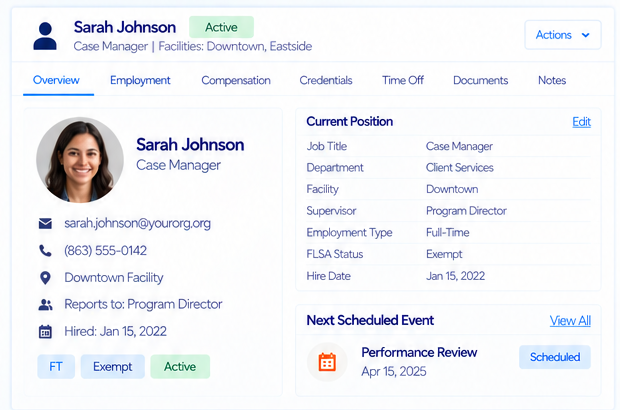
Human Resources in SecureCare is the employment record for the people who deliver your mission — who they are, what they're paid, what they're qualified to do, who they report to, and when they're away. It is not a payroll engine, not an applicant tracking system, and not a spreadsheet you email around at review time. Every profile is built from dated events rather than overwritten fields, so the answer to "what was true in March?" is always still there. Compensation history feeds grant reporting directly. Credential status keeps itself current. And every tab is gated by its own permission, so the people who manage departments never have to see anyone's pay.

SecureCare® screenshot of feature
  • The Whole Employment Lifecycle in One Place

    Staff profiles, engagement events, compensation history, emergency contacts, credentials, org structure, and time off all live on the same record. Select a staff member once and every employment concern is a tab away — no separate systems to reconcile, no second place where a termination date has to be re-entered. Platform concerns like facility assignments and scheduling stay where they belong, in Staff Members; HR keeps the employment story.

  • Events Are the Record, the Profile Is Just the Latest Page

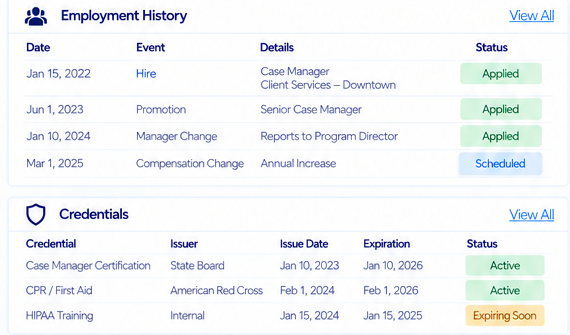
    Hires, promotions, job changes, manager changes, leaves, and separations are recorded as dated engagement events. The profile you see is the snapshot those events have produced. Nothing is silently overwritten, so a promotion in 2023 is still a promotion in 2023 — not an old title nobody can prove. Applied events are frozen against edits; only notes and reason text stay open.

  • Schedule the Change, Then Forget About It

    Give an event a future effective date and it is recorded as Scheduled — visible to everyone, applied to nobody. When the date arrives the platform applies it to the profile on its own: status flips, position rolls forward, the new manager appears in the org chart. Scheduled events can be edited or cancelled right up until they land. Nobody has to remember to go and update a record on the first of the month.

  • Compensation History That Answers "What Were They Paid Then?"

    Every pay change is a time-stamped record — the initial rate at hire and every raise, adjustment, and reclassification since. Salary, hourly, and contracted pay types all resolve to an hourly equivalent, which is exactly what grant reporting needs. When staff time is charged to a grant, the platform looks up the rate that was in effect on the work date, not the rate the person earns today. Restating a year of grant expenditure because someone got a raise in June is not a thing that happens here.

  • Positions Are Roles, People Are People

    Budgeted positions exist independently of whoever currently fills them — each with a title, department, reports-to line, FTE, salary band, and budgeted headcount. Filled counts are derived live from active staff, and the grid flags any position carrying more people than it was budgeted for. Departments nest into a hierarchy, carry a GL code for cost allocation, and refuse to be deleted while anyone is still assigned to them.

  • Credential Status Nobody Has to Maintain

    Licenses, certifications, training records, and background checks are tracked org-wide, and their status is calculated from the expiry date and verification state every time you look — Active, Expiring within thirty days, Expired, or Pending verification. There is no status field to forget to update. Filter the grid to Expiring and you have your renewal list for the month. Certificates and license scans attach to the record itself, encrypted like every other document on the platform.

  • An Org Chart You Can Actually Rearrange

    The reporting hierarchy is drawn from each staff member's Reports To field and rendered as an interactive tree of active staff. Drag a card onto a new manager, confirm the change, and the reporting line is updated — and recorded as a Role Change engagement event on that person's profile, because a reorg is employment history too. Circular reporting is prevented outright: your own reports are disabled as drop targets while you drag.

  • Time Off With Your Policy Behind It

    Staff submit requests from their own time entry view; HR and approvers work them from a pending queue. Your policy decides the rest — how far back a request can be dated, how far ahead it can be booked, the smallest increment allowed, whether a direct manager can approve, whether a named approver can, or whether submissions are simply auto-approved. Public holidays are blocked from selection before a request is ever submitted. Requests are cancelled rather than deleted, so the audit trail survives; hard deletion is an HR-only action reserved for corrections.

  • PTO That Accrues by Tenure, With Exceptions by Name

    Accrual policies map years of service to an annual hours entitlement, and a background worker credits each staff member's ledger against the bracket they fall into. Every posting, pending request, and manual adjustment appears in one ledger with a running available balance. When someone needs to draw against future accrual, HR grants a named, time-bounded exception with a required reason — not a quiet change to the org-wide policy that nobody remembers making.

  • Staff Update Their Own Details — HR Decides What Sticks

    Staff members submit changes to their own personal information and those requests queue for review rather than writing straight to the record. Approve or reject each change individually, or process a whole submission in one action. Rejections require a reviewer note. The platform record only ever changes when someone with the authority to change it says so.

  • Permissions Drawn Where the Sensitivity Is

    Staff profiles, departments, positions, salary bands, credentials, the org chart, time off, and HR settings each carry their own view and full-control permissions. A department manager can maintain org structure without ever seeing a pay figure. An approver can action leave without opening a personnel file. Access follows the job, not the module.