Grants

Grants

Restricted funds, modeled correctly.

Grant management is one of the genuinely hard problems in mission-driven finance. Funds are restricted — they can only be spent against approved budget lines, within performance dates, with documentation a funder will accept months later in an audit. Most operations platforms handle grants the way they handle a generic project budget. SecureCare doesn't. Each grant gets its own restricted ledger account, separate from operating funds, separate from other grants, with its own drawdown history, its own budget lines, its own reporting cadence, and its own closeout. The platform models cost-reimbursement and advance-payment grants both correctly — including the negative balance a cost-reimbursement grant carries when your organization has spent ahead of the funder's drawdown. That's not an error in the books; it's a receivable owed by the funder, and the platform represents it as such.

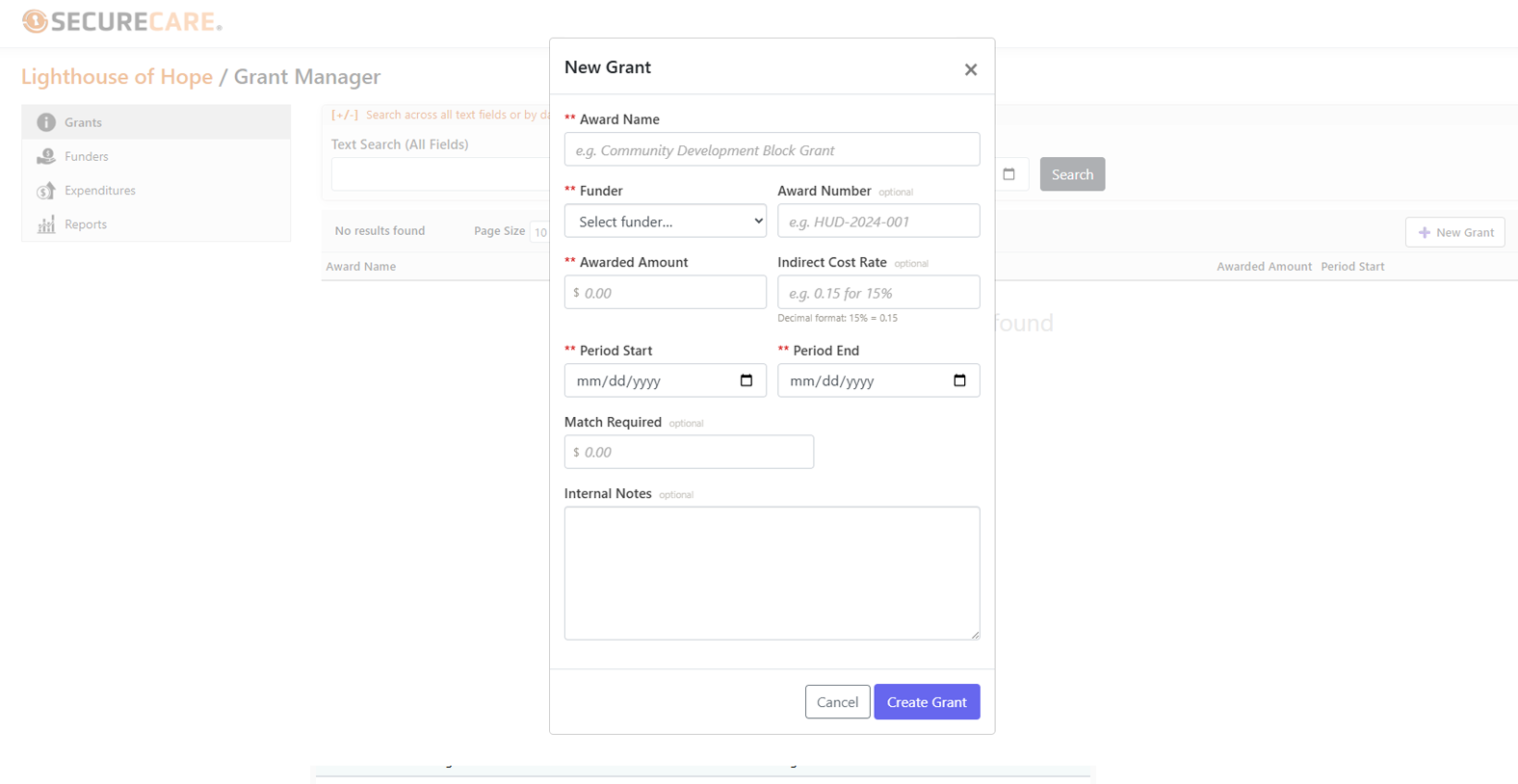
SecureCare® screenshot of feature
  • One Restricted Account Per Grant

    Every grant award gets its own dedicated ledger account — a GrantRestricted account, created atomically with the grant record. Funds from one grant are never commingled with funds from another, never commingled with operating revenue, never commingled with donations. This isn't an internal tagging convention; it's a real account on the books, separate from settlement and escrow flows because grant funds don't need to clear external processors. Both the cleared and available balances update together on every operation — no settlement window, no clearing delay.

  • Cost-Reimbursement and Advance-Payment, Both Done Right

    Grants come in two flavors and SecureCare handles both honestly. Advance-payment: the funder sends money up front; the grant balance starts positive and decreases as you spend. Cost-reimbursement: you spend first, then request reimbursement; the grant balance goes negative as expenditures land, representing the receivable your funder owes. Most platforms either don't support cost-reimbursement at all or treat negative balances as integrity errors. SecureCare treats them as expected and valid — the negative balance is the receivable, exactly as a CPA would model it. Government grants almost universally work this way; SecureCare's books reflect that reality.

  • Budget Lines With Amendment History

    Each grant has budget lines for the approved spending categories — Personnel, Fringe, Supplies, Travel, Contractual, Indirect, Equipment, Other. The lines must sum to the awarded amount; the platform enforces this on every save. When a funder approves a reallocation, the line is amended and the original approved amount is preserved alongside the new one — with a required amendment note, time-stamped, in the audit trail. You can always see the original budget, the current budget, what's been spent against each line, and what's left. The funder can verify it the same way you can.

  • Drawdowns That Tie to the Ledger

    Every drawdown — funds received from the funder — is recorded as a true double-entry ledger transaction. The grant's restricted account is credited; the operating account is debited; the running balance updates. Total drawdowns cannot exceed the awarded amount; the platform blocks any drawdown that would push past it. The drawdown history tab shows every receipt in chronological order, with the running balance after each, so a board treasurer or auditor can trace the full receipt-to-spend story without leaving the platform.

  • Expenditure Tracking, Linked to Real Records

    Expenditures aren't just amounts in a column. Each expenditure links to its actual source record — a transaction in the operating ledger, an approved staff member time entry, an approved volunteer time entry, or a manual entry referencing an invoice or receipt. The link means a funder reviewing a Personnel expenditure can trace it back to the timesheet that supported it; a Supplies expenditure traces back to the actual purchase. Matching contributions are tracked alongside without generating ledger entries — cash match, in-kind match, and third-party match are all recorded and reportable, but only the cash flows hit the books.

  • The Reporting Cadence the Funder Set

    Each grant carries its own reporting milestones — quarterly, biannual, annual, project-completion, or whatever the funder agreement specified. Reports move through a defined lifecycle: Upcoming → In Progress → Submitted → Accepted (or Rejected, then resubmitted). Submitting a report freezes the financial summary at that moment, generates a PDF, and attaches the PDF to the report record. The submitted PDF is the authoritative artifact — the funder gets a snapshot, you keep a copy, and the platform tracks who submitted and when. Overdue reports surface with a flag in the report list so nothing slips past a deadline.

  • No-Cost Extensions, Audit-Ready

    When a project needs more time but no additional funding, a no-cost extension extends the grant's performance period without changing the award. SecureCare requires a reason or funder approval reference for every NCE — that note becomes part of the permanent audit trail. The new end date must be later than the current end date, and the platform validates that the grant is in a state where extension is allowed (Active or Reporting only, not Pending or Closed). Once extended, expenditures and reports can be recorded up to the new date.

  • Funder Records, Maintained Once

    Funder records are managed at the organization level, separate from the grants themselves — a foundation, government agency at any level, corporate giver, or other source. One funder can fund multiple grants over time; the relationship is maintained once and reused. Funders can be linked to a donor record on the Donors side of the platform when relevant, so attribution reports can pull the full story together. Deleting a funder is blocked while any non-closed grants still reference them — the platform protects the historical record from accidental data loss.

  • The Grant Lifecycle, From Pending to Closeout

    Grants move through a defined status flow: Pending → Active → Reporting → Closed. Activation requires budget lines summing to the awarded amount — you can't activate an underfunded budget. Beginning Reporting moves the grant past its performance period; expenditures and drawdowns can still be recorded for in-period activity. Closing the grant requires every report to be Accepted — no closeout with reports outstanding. Each transition is tracked, audited, and visible. Grants can be cancelled from any non-Closed state when an award falls through; the restricted account is retired and the audit trail is preserved.

  • Connected to the Rest of the Ledger

    Grants don't sit in a silo. Drawdowns and expenditures are real ledger transactions on the same double-entry foundation as Accounting & Payments. The Donor Attribution Report on the Donors side can include or exclude grant funds based on what the audience needs. The Financial Accountability Statement under Reports includes grant balances when generated at the organization level. The grant module is its own surface, but the books underneath are everyone's books.