Operational Home
Programs, staff, hours, inventory, documents, and community activity stay anchored to the location where the work happens.

FACILITIES
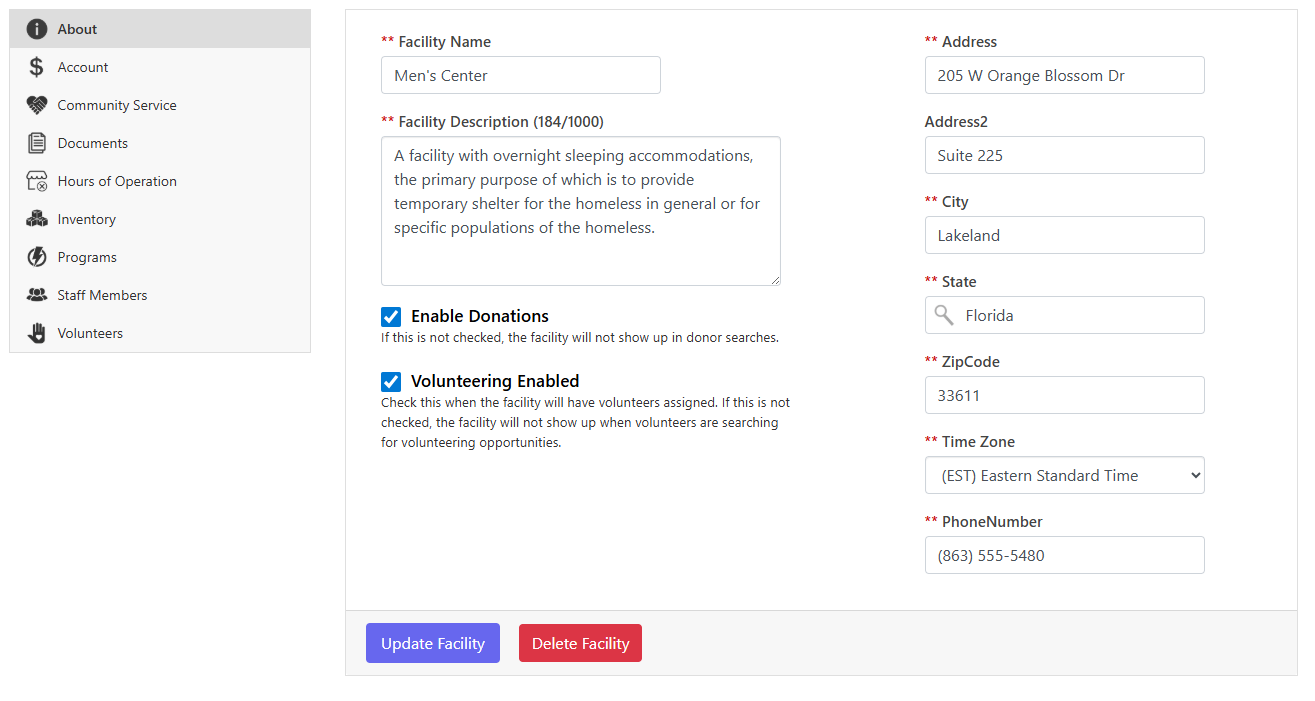
In SecureCare, a facility is more than an address. It is the operating unit where programs run, staff work, donations can be directed, inventory is held, hours are enforced, and facility financial activity rolls into the organization.
Programs, staff, hours, inventory, documents, and community activity stay anchored to the location where the work happens.
Facility accounts remain distinct while rolling into the organization’s consolidated financial picture.
Public and work hours, closures, and staff-schedule validation keep availability aligned to the real building schedule.
Each facility holds its own stock and connects distribution to services and community outreach.
Donations, volunteering, programs, staff assignments, and documents can all be configured from the facility.
HOW IT WORKS
Facilities define the operational boundary SecureCare uses throughout the platform. Changes to hours, permissions, program availability, inventory, and financial context all stay tied to the place where the work occurs.
Set identity, address, contact information, and time zone.
Define public hours, staff work hours, and specific closures.
Connect staff, program access, and facility-specific permissions.
Run programs, community outreach, inventory, documents, and facility activity.
Facility activity contributes to organization-wide accounting and reporting.
A CLOSER LOOK
Facilities define the operational boundary SecureCare uses throughout the platform. Changes to hours, permissions, program availability, inventory, and financial context all stay tied to the place where the work occurs.
KEY CAPABILITIES
Maintain facility identity, location, contact information, and time zone.
Set weekly public hours and staff work hours with bulk day updates.
Record holidays, inspections, and other closed dates.
Flag staff schedules that would fall outside proposed facility hours.
See facility financial activity and transaction detail in its own context.
Run outreach activity tied to the facility without requiring a customer case.
Track stock held and distributed from this facility.
Configure the programs delivered at this location.
Assign staff and control what they can do at this facility and its programs.
CONNECTED ACROSS SECURECARE
Give every location the structure it needs — while keeping the organization connected.
PEOPLE. PURPOSE. POSSIBILITIES.