Always Attached
Every upload belongs to a real record instead of an orphan document folder.

DOCUMENT STORAGE
SecureCare Document Storage is built for record-bound documents — customer paperwork, signed forms, staff records, facility files, message attachments, and program documents — not for loose folders with no operational context.
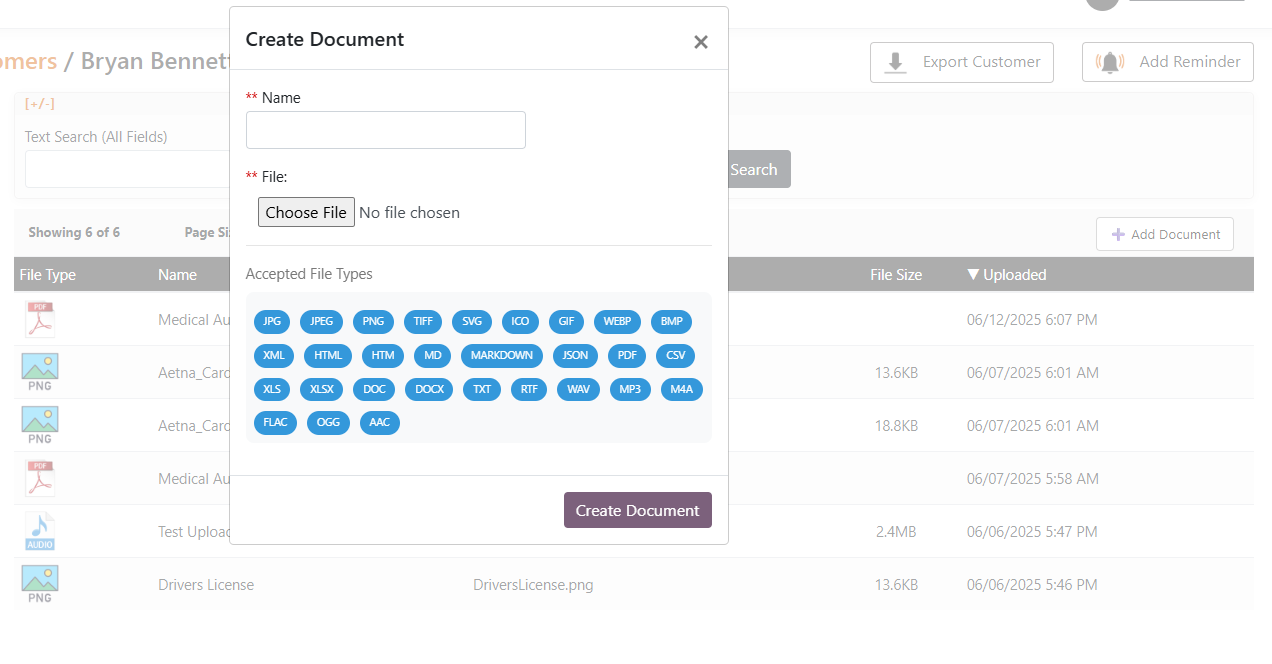
Every upload belongs to a real record instead of an orphan document folder.
Files are encrypted at rest and transmitted over TLS.
Staff-uploaded documents can be marked for record-owner visibility or staff-only use where supported.
Common document types can be opened in the browser without requiring a download first.
Soft-deleted files remain subject to retention, with permanent purge only through the retention-aware process.
HOW IT WORKS
SecureCare deliberately avoids a generic shared-drive model. The document stays with the record that gives it meaning, so staff find the paperwork in the same place they find the customer, facility, staff member, message, or signed request it belongs to.
Attach the file to the customer, case, service, message, facility, staff member, or other supported record.
SecureCare encrypts the stored file and maintains its record association.
Apply the supported public/private visibility rule for that document.
Search metadata and tags, filter by date/type, and open supported formats in the viewer.
Honor retention after deletion and permanently purge only when the file is eligible.
A CLOSER LOOK
SecureCare deliberately avoids a generic shared-drive model. The document stays with the record that gives it meaning, so staff find the paperwork in the same place they find the customer, facility, staff member, message, or signed request it belongs to.
KEY CAPABILITIES
Attach files directly to the records that own them.
Store files encrypted with per-record cryptographic context.
Protect uploads and downloads over encrypted transport.
Support record-owner visibility versus staff-only documents where applicable.
Open supported PDFs, images, Office files, and text in-platform.
Find files by name, filename, extension, tags, dates, and type.
Automatically retain completed signed PDFs from Signature Documents.
Preserve deleted records through the required retention window.
Recover capacity only after documents are eligible for hard deletion.
Track usage against the organization’s included and added storage allocation.
CONNECTED ACROSS SECURECARE
Keep sensitive paperwork where it belongs — with the record, the controls, and the history.
PEOPLE. PURPOSE. POSSIBILITIES.