
Promo Codes
Targeted discounts that the books still balance.
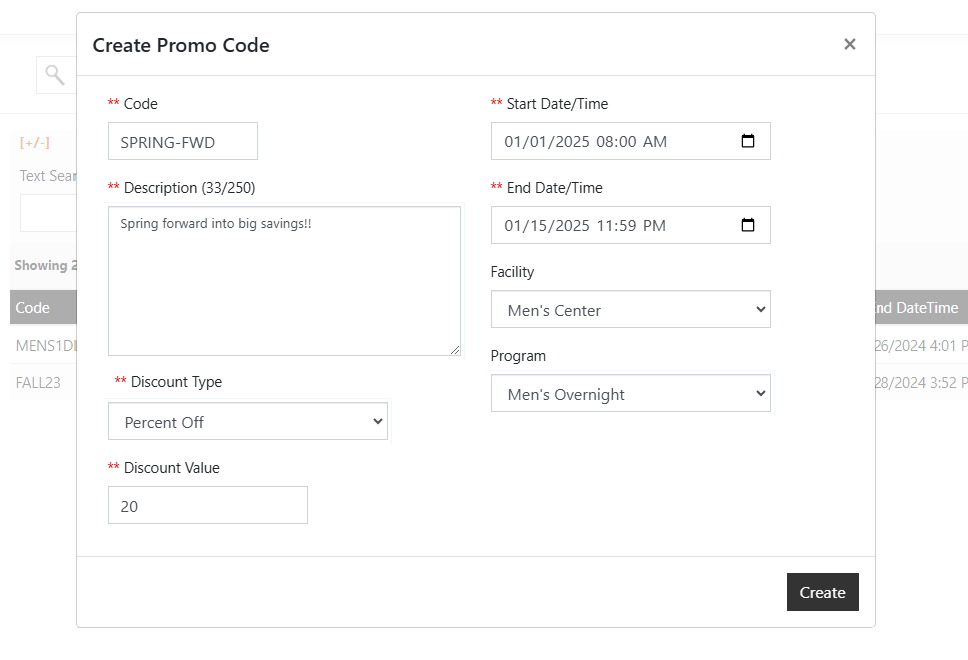
Promo codes in SecureCare are how organizations offer specific, time-bounded discounts to specific audiences for specific events or specific programs. The codes are explicit, not generic. A code doesn't apply to the whole platform; it applies to the events and programs you attach it to. The discount math runs at checkout and produces an honest invoice that records both the original price and the reduction. The ledger never shows the discount as cash that moved — because no cash moved — but the audit trail records exactly what was offered, to whom, when, and on which line. The next time someone asks why a customer paid less than the published rate, the answer is in the books.
-
Three Discount Types
SecureCare supports three discount calculations. Percent Off reduces the price by a percentage of the original. Dollar Amount Off subtracts a fixed amount. Discount Price overrides the price entirely — regardless of original cost, the payer pays exactly the discount value. Each type produces predictable, auditable results, and a code that would push the price below zero is rejected at validation.
-
Attached to Specific Events and Programs
A promo code only applies to the events and programs explicitly linked to it. There is no "platform-wide 10% off" toggle and no implicit cascade across an organization's offerings. Each code carries a list of eligible events and programs, configured by staff at creation time. Programs additionally need a Can Apply Promo Codes setting turned on per program, so a director can lock down sensitive billing programs from accidental discounting.
-
Date-Windowed Validity
Every code carries a start and end date-time. Outside the window, the code is rejected at checkout — before the window opens, after it closes, no exceptions, no manual override. Codes expire on schedule rather than requiring staff to remember to disable them, and a code created for an early-bird campaign can't accidentally redeem six months later.
-
One Code Per Invoice Payment
SecureCare allows at most one promo code per invoice payment. No code stacking, no "10% off + $5 off + free shipping" arithmetic that ends up overcharging or undercharging the books. Applying a code also requires paying the full remaining balance in a single transaction — partial payments don't get to ride a discount. The rule keeps the audit story clean: discount applied, invoice paid, both events recorded together.
-
Audit-Logged at Application
When staff apply a code on a customer's behalf, the platform records a change-log entry containing the original price, the new price, the discount amount, and the code itself. The discount appears on the invoice as a separate negative line, not as a quiet adjustment to the original line item. An auditor reviewing why a customer paid $40 instead of $50 sees the code, sees the discount line, and sees who applied it.
-
Discount Without Cash Movement
A promo code reduces what the payer owes — it does not move cash. The platform records the discount as a balance reduction on the invoice with a reference to the code, but no ledger entry is written for the discount itself. Only the actual cash payment flows through the ledger. This means promo discounts don't appear as expenses, don't need to be reconciled against a "discounts given" account, and don't distort revenue reporting. The price was lower because the offer was lower; the books reflect what actually happened.
-
One-Shot on Recurring Payments
If a customer applies a promo code when setting up a payment plan, the discount is honored on the initial payment only. Subsequent monthly charges run at the regular invoice amount, distributed proportionally across remaining line items. This keeps the math honest: a "20% off your first month" promotion does exactly that, and a customer who tries to game an indefinite monthly discount finds the platform doesn't support it.
-
Connected to Events, Programs, and the Ledger
Promo codes don't run their own side-system. They attach to Events and Programs as a configuration, validate at checkout, and emit their audit trail through the same change-log infrastructure every other transaction uses. The codes you create are a part of the ledger; they aren't a workaround for it.