Assessments
The questions your work depends on, asked the right way.
Mission-driven organizations make decisions about people based on the information they collect at intake and during care. SecureCare ships with 48 built-in assessment types covering the domains that human-services and behavioral-health work actually requires — from housing history and family relationships to standardized clinical screens like GAD-7, PHQ-9, ACEs, and AUDIT. The clinical screens come with the official scales the instruments were validated against, so your scoring matches the published interpretation. Build your own assessments with the custom builder when your work needs something the library doesn't cover. Score them, lock them when complete, and use the data the work generates — without re-keying anything into a separate analytics tool.
-
48 Built-In Assessment Types
The library covers the work mission-driven organizations actually do: data-collection assessments for Education, Employers, Family Members, Doctor Visits, Income, Expenses, Housing, Shelter Stays, 30-Day Sleep Locations, Substances, Recovery Efforts, Arrests, Conservators, and Medicines. Profile assessments for Personality Traits, Daily Living Difficulties, Allergens, Parental Strengths, Socialization, Housing Barriers, and Immediate Needs. Domain questionnaires for Employment, Family, Financial, Health & Wellness, Homelessness, and Unemployment. The breadth isn't accidental — the library was built around what human-services case work documented over decades.
-
Standardized Clinical Screens, Built In
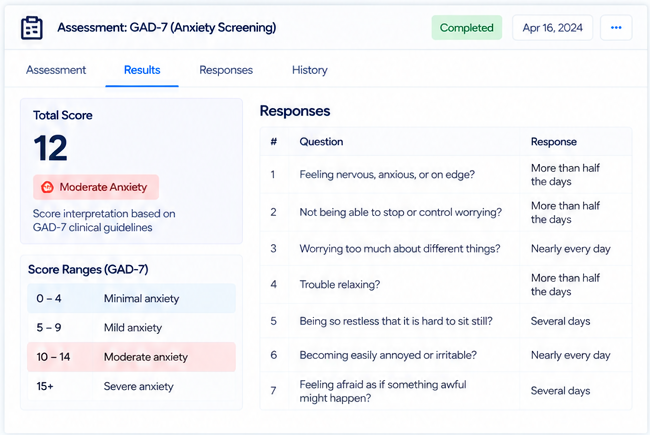
SecureCare ships with sixteen standardized clinical screening instruments out of the box: GAD-7 (anxiety), PHQ-9 (depression), ACEs (adverse childhood experiences), AUDIT (alcohol use), DAST-10 (drug abuse), CAGE-AID (substance abuse), PC-PTSD-5 (PTSD primary care screen), C-SSRS (suicide risk), SCOFF (eating disorders), PCL-5 (PTSD checklist), MDQ (mood disorder), PSS-10 (perceived stress), SPIN (social phobia), ASRS (adult ADHD), WHO-5 (well-being), and BASIS-24 (behavioral and symptom identification). Each comes with the official response scales the instruments were validated with — so the score a staff member sees matches the score the published guidance interprets. No invented scales; no scoring drift.
-
Three Formats, Tuned to the Question
Assessments render in the format that fits the data they capture. Repeating data lists handle background information that comes in rows — every employer, every shelter stay, every prescribed medication. Question-by-question formats handle scored questionnaires — clinical screens, intake questionnaires, domain-specific Q&A. Chip/multi-select formats handle profile-style data — checking off relevant items from a curated list. The format is part of the assessment definition; staff don't have to learn three different tools.
-
Custom Assessments, Built Once, Used Forever
When the built-in library doesn't cover something your work needs, build your own. Define the questions, pick the data type for each answer (single-line text, multi-line text, date, datetime, number, select list, checkbox, header, yes/no, agree/disagree, 1-10, plus standardized clinical scales when relevant). Group questions under header rows. Mark questions required. Configure scoring — set ranges that translate the total into Fair / Moderate / Severe (or whatever vocabulary your clinical practice uses). Assign the assessment to specific facilities. Once it's built, your staff add it to cases as many times as needed; revise the template when the work needs to evolve.
-
The Right Scales for the Right Instruments
Behind the question types is a library of response scales calibrated to specific clinical instruments. The GAD-7 Frequency Scale (Not at all / Several days / More than half the days / Nearly every day). The AUDIT Drinks Scale (1 or 2 / 3 or 4 / 5 or 6 / 7 to 9 / 10 or more). The ASRS Frequency Scale, the PSS Frequency Scale, the WHO-5 Time Scale, the 0-4 Severity Scale — each scale matches the instrument it was designed for. Custom data types your organization defines appear alongside the built-in ones. Use a scale once or use it across a hundred custom assessments — the scale is the type, not a per-question setting.
-
Scoring That Tells You What the Score Means
Scored assessments aren't just a number. Configure score ranges in the builder — "0-4 = minimal anxiety, 5-9 = mild, 10-14 = moderate, 15+ = severe" — and the assessment surfaces the interpretation alongside the raw total when staff complete it. The clinical screens come with their published score interpretations pre-configured (the cutoffs that make GAD-7, PHQ-9, AUDIT, etc. meaningful). Custom assessments let your organization define the interpretation that matches your clinical or programmatic logic. The total is data; the interpretation is the answer.
-
Completed = Locked, with a Full Audit Trail
An assessment marked complete locks from further modification — the document of record is preserved as it was when signed off. Reopening requires the right permission and writes an audit entry. Every field-level edit on an open assessment is captured in the assessment's Changes tab: who changed what, when, with the previous value. The history isn't a separate compliance feature bolted on; it's built into how every assessment works.
-
Connected to Cases, Customers, Reports, and Grants
Assessments live on customer cases — documented in the Case Management module. The data they capture surfaces in case stats, drives intake decisions, and feeds Reports for outcome tracking and grant reporting. Demographic data captured at intake rolls up into the demographic reports funders ask for; clinical screens taken pre- and post-intervention support the outcome metrics organizations need to demonstrate impact. The assessment is the source; everything that needs the data reads from there.