Messaging
A channel for the conversations email shouldn't carry.
Staff at mission-driven organizations communicate with customers and volunteers about things personal email and consumer SMS were never built to carry — treatment plans, billing questions, schedule changes, sensitive coordination. SecureCare's Messaging is a HIPAA-aware channel staff open from inside the platform, where the conversation lives on the customer or volunteer's own record, where attachments come from the document repositories the organization already maintains, and where the recipient signs in (or follows a temporary access link) to a thread the platform encrypts end-to-end of its custody. Customers reply to staff. Volunteers reply to coordinators. Staff initiate every conversation; the platform keeps every word and every file in context.
-
Staff-Initiated, By Design
Customers and volunteers can't start a thread out of the blue. Staff open the conversation; staff define the subject, the recipient, and whether reply is allowed. Staff control whether external access is granted, when it expires, and what identity check the recipient must complete to read the thread. The asymmetry isn't accidental — the platform's job is to give organizations a tool for outreach they can govern, not an open inbox for every patron to start whatever conversation they choose.
-
Conversations Live on the Record
Every message thread lives on the customer or volunteer record it belongs to — not in a separate messaging silo. The customer's Secure Messages tab shows every thread the organization has ever had with them; the volunteer's Secure Messages tab does the same. When a new staff member picks up a case six months in, they read the conversation history alongside the case notes. Email and consumer SMS scatter context across personal inboxes; SecureCare keeps it where the work happens.
-
Three Sources for Attachments — No Re-Uploading
When attaching a file to a message, staff choose from three sources: the local computer (any file), the organization's document library (any non-private organizational document), or the customer's own document repository (anything already filed against the customer). The third source is the moat: a release form already on the customer's record can be attached to a follow-up message in one click, no re-upload, no manual move. The file stays where it lives; the message references it. Storage doesn't multiply.
-
External Access for People Without an Account
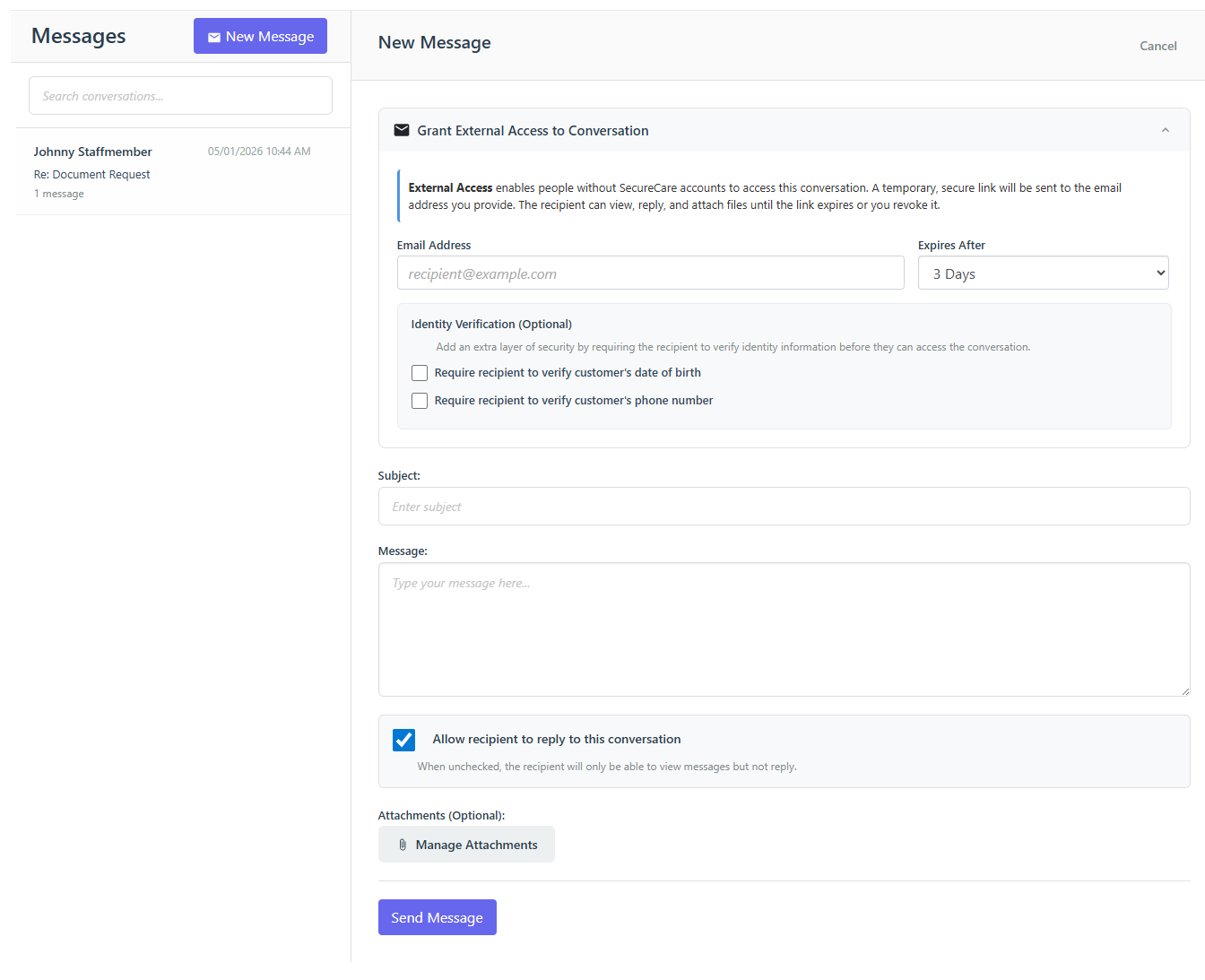
Not every recipient has a Patron account. A guarantor handling billing, a parent of a customer, a one-time volunteer applicant — none of them needs to create an account just to receive a message. Staff send the thread to an email address; the recipient gets a link; the link opens the conversation in the browser without sign-in. Optional date-of-birth and phone number checks gate access at the staff member's discretion. The link expires on the staff member's chosen schedule (3 days, a week, longer) and can be revoked at any time. The conversation is the same one staff sees from the platform side; just the access path differs.
-
Identity Verification That Doesn't Get In Its Own Way
For sensitive threads, staff can require the external recipient to validate identity before reading — date of birth, phone number, both, or neither. The recipient enters the requested information once per browser session; the platform validates against the customer's record and either grants access or logs the failure. IP-based rate limiting prevents brute-force attempts. Authentication failures are recorded with the same audit log the rest of the platform uses, so a compliance review can see who tried to access what and when.
-
Encryption That Lives Past the Database
Every message body and every attachment is encrypted with a dual-salt scheme — a per-record salt unique to that conversation, plus an application-level salt held outside the database. A database backup stolen alone is useless without the application salt. The application salt alone is useless without the per-record salt that lives inside the database. The two halves only come together at runtime, in memory, on the platform's servers. This is the same encryption posture the rest of SecureCare's documents and PHI use, applied to the messaging channel without exception.
-
Read Receipts and Conversation State
Every message shows when it was sent and when (or whether) the recipient read it. Single check on send, double check on read. Staff see at a glance which messages have landed. Recipients see the full conversation history with timestamps; their own messages carry the same indicators when staff respond. The platform doesn't pretend reads happen instantly; it shows what actually happened.
-
File Limits, Honestly Stated
Attachments cap at 25 MB each. ZIP files are blocked — the format hides too much from antivirus scanning to be safe in a healthcare context. Other formats (PDF, images, Office documents, plain text) work normally. The constraints are explicit so staff know what to expect; nothing fails silently at the back end.
-
Connected to Documents and the Audit Trail
Every attachment sent or received in a message becomes a real document in Document Storage on the relevant record — with the same encryption, the same retention, the same access controls. A file shared via message is searchable, downloadable through the standard document viewer, and counts against the same storage allocation. The conversation itself contributes to the platform's audit trail: who opened it, when, who replied, when the link was revoked, when external access was granted. Compliance reviews don't need a separate messaging audit because messaging is part of the records audit.