Events

Events

Tickets, schedules, scanning — all under one roof.

Mission-driven organizations run events — galas, fundraisers, conferences, community programs, ticketed shows. SecureCare's Events module handles the full lifecycle from drafting the event in private to scanning the last ticket at the door. Multiple ticket tiers with date-windowed override pricing for early-bird, presale, and last-minute promotions. Staff and volunteer assignments tied to specific schedule slots with their own arrive/leave windows. A built-in QR scanner that works on any smartphone, optimized for the poor Wi-Fi reality of outdoor venues and crowded ballrooms. A refund builder for when plans change. The whole event runs on the same platform that runs the rest of your operation — proceeds route to the right facility, promo codes apply per the rules you already set, ticket sales reconcile against the same ledger your accountant trusts.

  • Draft, Publish, Suspend, Close, Cancel

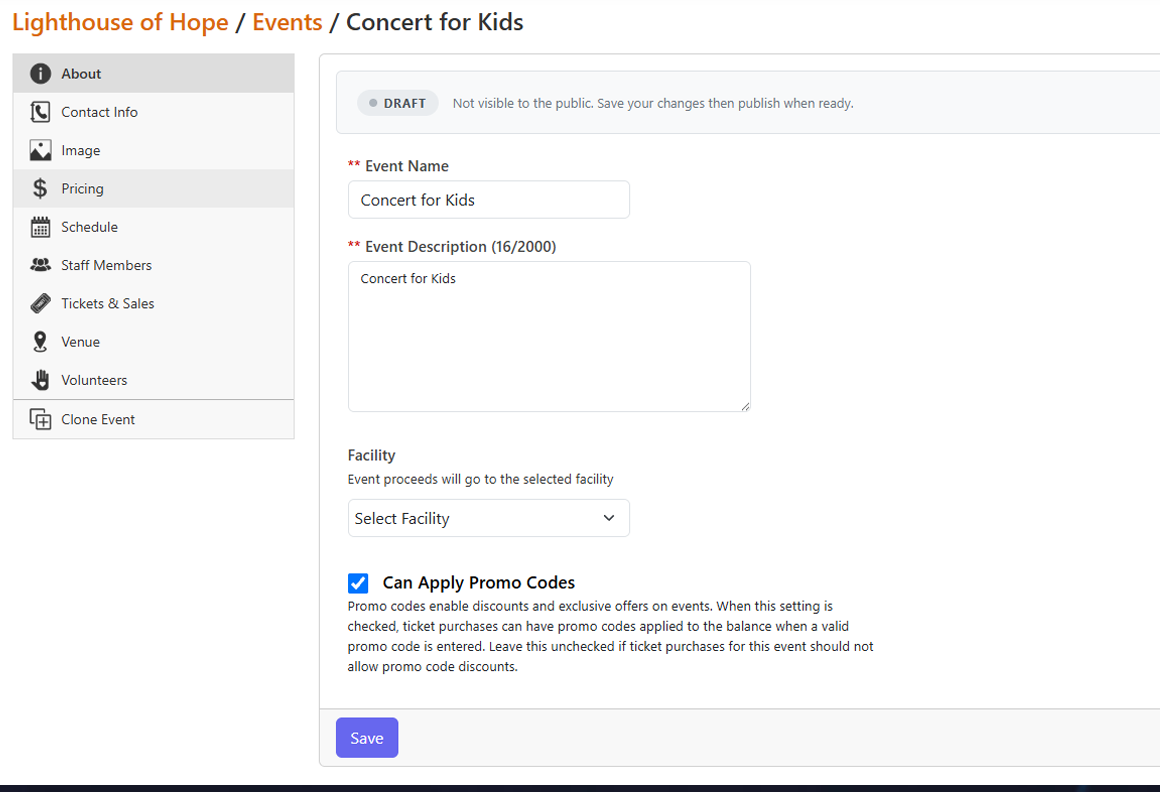
    Events have a defined lifecycle. Draft while you're still configuring — not visible to the public, no risk of accidental sales. Live once you publish — tickets on sale, event listed publicly, edits still allowed (with the option to notify existing purchasers when something material changes). Suspended if you need to take an event offline temporarily. Closed when the event is over — the books stay open for refund processing and history review. Cancelled if the event won't happen at all — immediately notifies all ticket holders so nobody shows up to a locked door.

  • Multiple Ticket Tiers, Date-Windowed Pricing

    Most platforms force you to choose between "one ticket type" and "build a separate SKU for every promotion." SecureCare splits the difference. Each ticket tier (General Admission, VIP, Banquet, Sponsor) has a base price — and optional date-windowed override prices that automatically take effect during their window. Configure your $20 early-bird from May 8 to May 25, then back to $50 from May 26 onward, all on one tier. The system shows the right price at the right time without any manual changes.

  • Private Prices for Internal Allocations

    Some tickets aren't for the public. Mark a price tier as Private and it disappears from the public patron portal — visible only to staff processing internal transactions. Use this for radio-station promotions, donor-of-the-year comps, staff member allocations, sponsor seats, or any tickets you need reserved without putting them in the open. The private allocation counts against capacity but doesn't show up on the public listing or in checkout flows.

  • Schedules That Hold Three Time Windows

    Real events don't run on a single time. The doors open at 6 PM but staff arrive at 4 PM for setup, and volunteers arrive at 5 PM for orientation. SecureCare's schedule entries hold all three windows separately — the event time (when the actual event takes place), the staff assignment time (when staff should arrive and leave), and the volunteer assignment time (when volunteers should arrive and leave). Each can be set independently, or the staff and volunteer windows can default to event times if no separate windows are needed.

  • Staff and Volunteer Assignments, Per Schedule

    For multi-day or multi-session events, staff and volunteers are assigned to specific schedule slots, not to the event as a whole. A volunteer covering Saturday's morning shift doesn't get assignments for Sunday afternoon. Each assignment carries a job description (Usher, Greeter, Photographer, Bartender, Setup Crew) and an optional scan capability — the per-schedule toggle that controls whether this person can use the ticket scanner on the day. Volunteers come from the Volunteer Central opportunity flow; staff are assigned directly from the event.

  • QR Ticket Scanner That Survives Bad Wi-Fi

    The built-in QR scanner runs on any smartphone with a modern browser — no special hardware, no app installs, no per-device licensing. Scan the QR code on a ticket, and the system validates it instantly with green for valid, red for already-redeemed or invalid. The scanner is optimized to remain fast even when network conditions are bad, which is the actual reality of outdoor venues, basement event spaces, and crowded ballrooms with overloaded Wi-Fi. Each scan logs the timestamp and the staff or volunteer account that performed it, for a full audit trail of who entered when.

  • Multi-Seat Tickets — Tables, Couples, Groups

    Selling tickets for tables of eight, couples passes, or group bookings? Configure the seats-per-ticket count on the tier. The QR scanner walks through each seat individually — "Seat 1 of 8 checked in, Seat 2 of 8 checked in" — and the ticket remains valid until all seats have been used. Each seat scan is recorded separately, so the audit trail shows exactly who came through the door on a group ticket.

  • Refund Builder for When Plans Change

    Things change. Bands cancel. Weather happens. Some attendees can't make it. SecureCare's Refund Builder lets you select exactly which payments to refund — one ticket, ten tickets, every paid ticket on the event — with a live summary of selected count and total refund amount. Refunds are queued for asynchronous processing through the payment processor; ticket holders receive confirmation emails as each refund settles. Refunds are never automatic, even on a cancelled event — staff process them deliberately through the Refund Builder so the books stay aligned with intent.

  • Promo Codes Welcome (When You Allow Them)

    Each event has a Can Apply Promo Codes toggle. Turn it on, and ticket purchases at checkout can apply promo codes attached to that specific event. Turn it off, and the event runs at its published prices, no exceptions. The control is per-event so a sponsored gala with no discount allowance and an early-bird community event with a 20% off code can both coexist on the same platform.

  • Sales Summary & Variance Tracking

    The Sales Summary tab aggregates ticket sales by tier with capacity, sold count, remaining inventory, actual revenue, capacity revenue (what you'd earn at full sellout), and variance (actual as a percentage of capacity). Watch your sellout rate climb in real time. Catch underperforming tiers before the event happens. The data is the same data the platform uses to render the public ticket counter; staff see the operator view, patrons see the buyer view, both are the same numbers.

  • Clone an Event for Next Year

    Annual gala, monthly fundraiser, recurring community series — events that repeat shouldn't be rebuilt from scratch. Clone Event creates a new draft preserving the name, description, pricing tiers (with date windows), venue, contact, and schedule structure. Ticket purchases and staff/volunteer assignments don't carry over — the cloned event starts clean for fresh sales and a fresh team. Clone works on closed and cancelled events too, so a successful gala becomes the template for next year's gala in seconds.

  • Connected to Facilities, Volunteers, Promo Codes, and the Books

    Events route their proceeds to the Facility the event benefits — multi-facility organizations can run regional events for specific facilities without manual reconciliation. Volunteer assignments draw from the Volunteer Central opportunity flow with skill matching and approval. Promo codes attach via the Promo Codes module. Ticket sales hit the platform's double-entry ledger like any other transaction. Hours staff and volunteers log against the event flow through Time Entry. The event isn't a side-system; it's part of the platform.