Inventory
Stock, sources, and where every unit went.
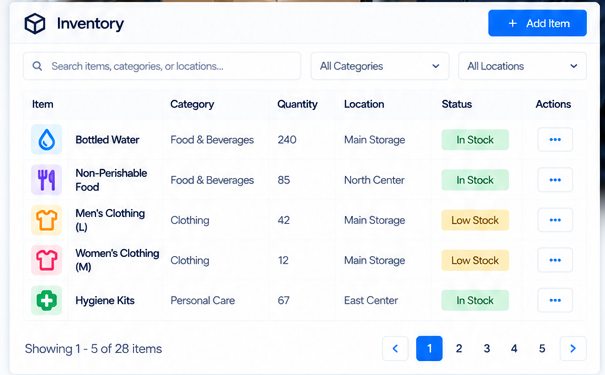
Mission-driven organizations move physical goods. Donated food and clothing arrive at the loading dock. Hygiene supplies stack in the storage closet. Bibles, books, blankets, and water bottles get handed out at outreach sessions, given to residents, and stocked at facilities. SecureCare's Inventory module tracks all of it — per facility, per location within that facility, per source, per case-pack-broken-into-individual-units, per bundle assembled and dispensed. Distribution templates pre-stage stock for outreach work. Sources tie back to the donors who contributed. Break Pack converts a case of 24 into 24 individual units with a full audit trail. Returns work both directions. The result: when a grant report or auditor asks where a specific unit came from and where it went, the answer is in the system.
-
Per-Facility Stock With Multi-Location Storage
Each facility has its own independent stock. A multi-facility organization running three shelters has three independent inventory pools — the supplies at the women's shelter don't bleed into the family shelter's counts. Within a facility, items live at named locations: Food Pantry – Main, Donation Drop-Off, Dormitory 2, Family Unit 1, Classroom A, Warehouse – Main. Add new locations as your physical layout grows. The dashboard shows stock-by-location at a glance so staff know where to look for what they need.
-
Break Pack — Cases In, Individual Units Out
Goods rarely arrive packaged the way they're distributed. A case of 24 water bottles arrives as one Case; the staff hand out individual bottles. SecureCare handles this natively with Break Pack. Receive the case as a parent SKU (Unit: Case, Unit Qty: 24). When the case is opened for distribution, run Break Pack — the parent SKU decrements, a linked child SKU (the individual bottle) increments by 24. The two SKUs stay connected so the next case received and broken just adds to the same individual-unit pool. The audit trail captures who broke which pack and when. If a returned pallet needs to be reassembled, the broken quantities can be returned to the parent.
-
Sources — Where Inventory Came From
Every item carries a source: the church that ran the canned-food drive, the individual donor who dropped off books, the supplier the org bought from. Sources are tracked over time with total contributions, last contribution date, and an active/inactive flag. Sources can link to Donor records — an in-kind contribution from a donor who also gives cash flows into the same donor relationship history, so the relationship view shows the full picture: $500 in March, 200 lbs of canned goods in April, $500 in May. The donor's giving history isn't split across systems.
-
Purchase Orders for the Things You Buy
Donations come in through sources directly — record the items, attribute the source. Purchases follow a different flow. Create a Purchase Order with an auto-generated PO number, an order date, an expected arrival date, the supplier (a source), notes, and line items each carrying quantity and unit cost. When the order arrives, the items hit inventory with the cost recorded. The supplier's contribution history reflects the volume; the cost data is available for grant reporting and budget reconciliation.
-
Bundles — The Assembled Distribution Unit
An outreach lunch isn't one item; it's a sandwich, a water, a snack, and a dessert. Define this as a Bundle — a named template that groups individual items at fixed quantities. The "Munn Park PB&J Lunch Bag" bundle holds one PB&J sandwich, one Little Debbie brownie, one 16oz water bottle, and one Bible. Dispense the bundle, and all four items decrement together. Bundles make outreach work fast: staff don't pick four items individually for every recipient; they dispense the bundle.
-
Distribution Templates — Pre-Stage for Outreach
The Wednesday lunch run at Munn Park needs 50 lunch bags. A Distribution Template says "this template reserves 50 of the Munn Park PB&J Lunch Bag bundle." When a Community Service Session is created from the template, those 50 bundles' worth of items move from On Hand to Reserved automatically. The kitchen knows the supplies are committed; the inventory dashboard reflects the reservation; another concurrent template can't accidentally claim the same items. When the session dispenses what was reserved, Reserved decrements; when items remain, they return to On Hand. No double-allocation, no manual reconciliation.
-
Returns Work Both Ways
Stock movements aren't one-way. A program service that consumed inventory can return items per-line if a service is cancelled or modified. A broken case can be reassembled if the rest of the goods need to ship together. Reservations release back to On Hand if a community service session is cancelled before dispense. Every reverse movement writes its own audit entry, so the history shows not just "10 dispensed" but "10 dispensed, 2 returned" with the timestamps and the staff member who performed each action. The audit trail tells the truth.
-
Expiry Tracking and Low-Stock Alerts
Food and consumables don't last forever. Each item carries an optional expiry date; the dashboard surfaces an Expiring Soon table for the next 30 days so staff use what's near expiration before it spoils. Separately, every item carries low and critical stock thresholds — the dashboard's Low Stock Alerts table flags items at or below threshold so reordering can happen before stock runs out. Out, Critical, and Low statuses each get their own visual treatment.
-
Barcode-Powered Item Entry
Adding items by typing every detail is slow. The Add Item form leads with a Barcode / UPC Lookup field — scan a product, the platform looks up whether you've already added that SKU and pre-fills the form if so. New items get added with their barcode attached, so future arrivals of the same product scan in instantly. Receiving days that used to take an hour take fifteen minutes.
-
Reporting Across Sources, Categories, and Locations
The Reporting tab carries six core reports: Current Stock Summary (everything on hand with status and location), Source Contributions (units received by source over a date range), Low Stock & Expiry (everything at risk), Bundle Usage (which bundles are dispensing most often), Inventory by Date Range (filterable by source or category), and Category & Location Breakdown (stock distribution across the physical and organizational dimensions). The data behind grant reports, board updates, and audit responses is already there.
-
Connected to Community Service, Programs, Donors, and the Books
Inventory is the foundation that Community Service Sessions consume for customer-less outreach work. Program Services consume inventory for customer-attached delivery. Inventory sources tie back to the Donors giving them, so in-kind contribution history lives alongside cash gifts. Purchase orders create the financial trail that flows through the platform's double-entry ledger. Inventory isn't a side-system — it's the supply layer the rest of the platform draws from.